The SLACM Application Model
A SLACM application consists of components that run inside actors that execute on hosts. A component is an object: an instance of a class in Python, that has a single execution thread that executes all component operations. An actor is a process that contains components, each running its own thread. A host is a node on the network that is capable of running SLACM applications, i.e. it has all SLACM packages installed.
The SLACM application developer creates components and creates an application model that represents how to application is assembled from components and how it is installed on the hosts. Optionally, a file containing the parameter settings for the components can be supplied, as well as configuration files that sets specific system configuration parameters. This package is handed to the SLACM tool (called ‘slacm_run’) that runs the application.
Components
A SLACM component is an object that has an execution thread, created by the framework. Components are reactive: they react to messages that are sent to the component. When the framework creates a component it runs its constructor then it launches the component’s thread that waits for messages sent to the component.
A component interacts with other components in the application via a messages, which are routed through ports that belong to components. A component ‘owns’ its port, but its port are ‘wired’ to ports of other components as described by the application model.
A port can be of type input, output, or both. Input and ‘both’ type ports can be used to receive a message, output and ‘both’ type ports can be used to send a message. The component code calls the appropriate ‘send’ or ‘receive’ operation on the port object it owns.
A component is always reactive: it reacts to messages arriving at its input ports. Each input port must have a corresponding message handler – a method of the component object, that will be called by the framework when a message arrives at a component. This handler must read (receive) the message from the port, and can send messages to output (or ‘both’ type) ports.
Port types and component interactions
Timer port
This is an input port that sends timer messages to the component. It is either periodic (with a fixed
periodicity) or aperiodic (with a programmable delay). The message received on the timer port is
a floating point number as generated by the time.time() function of Python.
Component interactions
SLACM is based on a subset of the communication patterns provided by ZeroMQ. A communication pattern specifies how messages are passed from component port to component port, and what protocol should the developer follow when using them.
Publish/subscribe
In this scheme, publisher components send messages through their ‘publish’ (pub) ports that get delivered
to all ‘subscriber’ (sub) ports of subscriber components connected to the source ports. The communication
pattern is many-to-many (i.e. one publisher can send to many subscribers, and one subscriber can receive from many
publishers) and uni-directional (i.e. messages always from pub-s to sub-s.
Request/reply
This is a bi-directional scheme where a client component sends a message through its ‘request’ (req) port that
goes to a server component’s ‘reply’ (rep) port. The server’s input handler should read this message, and generate
a response message and send it through the same rep port, so that the message will be routed to to the same
req port of the client, whose handler will be triggered, and this handler must read the message.
This approach implements a full round trip but it has a limitation. The client cannot send a new message until it has read the response message to a previous request message. In other words, the client/server must operate in a lock-step: client -> server -> client -> server, etc. As consequence, the server will always process (and respond to) the incoming messages in the order of their arrival.
Query/answer
This scheme is similar to request/reply scheme except it has no restriction: the client can send messages without
waiting for the responses. Furthermore, the server can process and respond to messages in arbitrary order. The
correspoding port types are called ‘query’ (qry) and ‘answer’ (ans).
Note that the developer creates the code for the component message handlers, one for each input (or ‘both’) type ports. The handler is called by the framework. The port objects are also created by the framework, and they provide the send and receive operations that the handler should use.
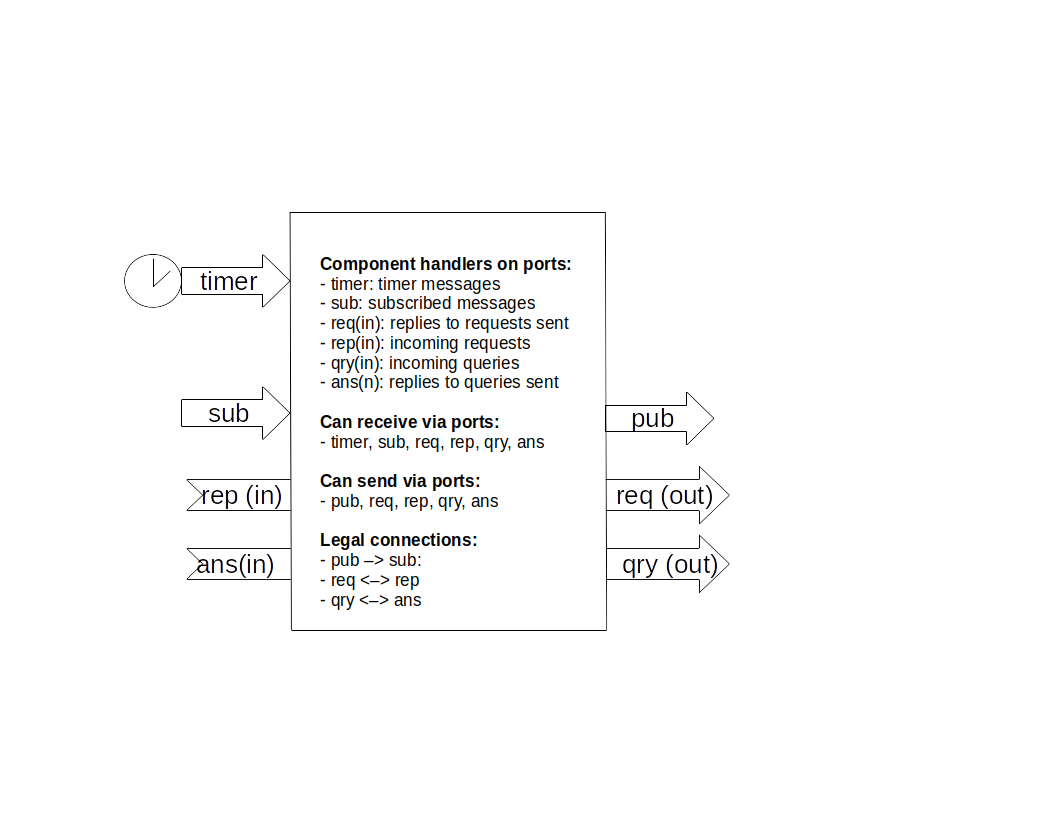
The figure below shows (1) all the possible ports of a component, (2) the handlers that must be implemented by the component, (3) the port types that support send and receive operations, and (4) the allowed connections among the ports.
Applications
The model of a SLACM application represents how the application is composed. The model specifies
the name of the application
the message topics the application uses
the components the application is built from
the actors that contain components
the hosts the application is to be run on
The example below shows a simple application model.
app App:	                // Application call 'App'
   msg PubTopic             // A message topic

   component PubComponent:  // A component that publishes messages
      timer t_port 1000     // has a timer port
      pub p_port : PubTopic // has publisher port

   component SubComponent:  // Another component tat subscribes to messages
      sub s_port : PubTopic // has a subscriber port

   actor AppActor:          // An actor that contains both components
      thePublisher : PubComponent
      theSubscriber: SubComponent

   host (rpi4car) AppActor  // The actor will run on host 'rpi4car'
The components communicate via messages, and each message belongs to a topic. This is just a label
used in wiring up the components. The components can send any Python objects via the ports, and the developer
is responsible for constructing and interpreting thos data structures. The topics are merely used for connecting
the ports, but the content and formatting of the messages is the responsibility of the developer. Note that ZeroMQ
provides operations for send/receiving Python objects (send_pyobj/recv_pyobj, as well as byte arrays (send/recv).
The wiring of component ports happens via matching the topics and following the connection rules between ports (as indicated on the component illustration above).
The simple application model introduces an application (App), and a message topic called PubTopic. Next,
defines two components. The first, PubComponent has a timer port, called t_port which is attached to a periodic timer
that fires every 1000 msec. It also has a pub port called p_port tha publishes messages of topic PubTopic.
The second component, SubComponent has a sub port called s_port that subscribes to messages of topic SubTopic.
The two components are packaged into a single actor called AppActor, and the component instancess are called thePublisher
and theSubscriber, respectively.
Finally, the application is to be run on a host on the network called rpi4car that will execute a copy of the AppActor. This
last depoyment specification can be missing, in which case the all actors of the application will run on the host the application files
are located. If a deployment is specified, the SLAC will copy the specified application actor(s) to the remote host(s) and runs them there.
For the latter, the remote hosts (1) must be accesible via public/private key, no password SSH logins, and (2) must have SLACM installed.
The figure below shows the architecture of the application described by the model.
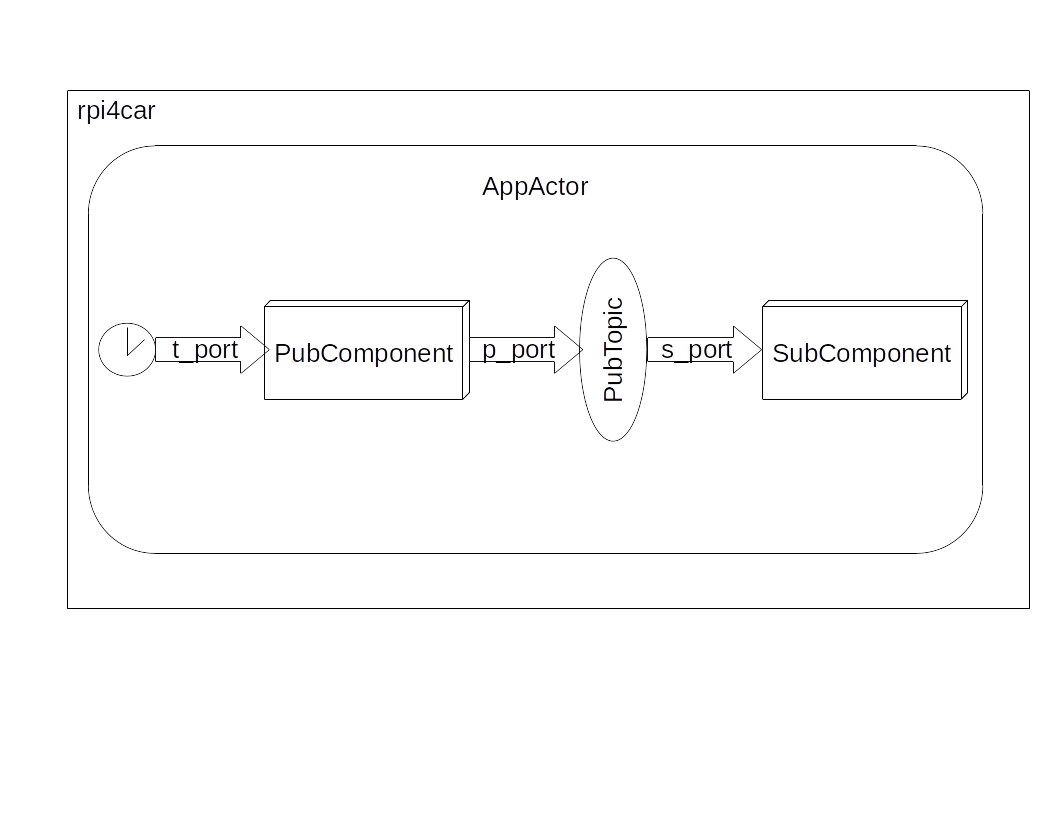
SLACM determines the ‘wiring’ (i.e. connections) between the component ports based on the message topic the port handled. In the above
example the p_port published ‘PubTopic’ messages, hence it got connected to the s_port because that subscribed to such topics. Note that
the matching by name is complete: if a component publishes topic X and subscribes to the same topic X then it will receive (and will be
triggered by) its own messages.
The following sample shows how to use other port types.
...
    message SensorReady
    message SensorQuery
    message SensorValue
...
   component Sensor:
      timer clock 1000 							// Periodic timer trigger to trigger sensor every 1 sec
      pub ready : SensorReady					// Publish port for SensorReady messages
      rep request : ( SensorQuery , SensorValue ) // Reply port to query the sensor and retrieve its value

    component LocalEstimator:
      sub ready : SensorReady					// Subscriber port to trigger component with SensorReady messages
      req query : (SensorQuery , SensorValue )	// Request port to query the sensor and retrieve its value

...
In the above example the req and rep ports of the Sensor and the LocalEstimator components are connected becaus ethey have matching
message topics (SensorQuery and SensorValue).NOte that for thise case there two message topics needed: one for the message going from the
req port to the rep port (SensorQuery), and another one for the message coming back (SensorValue). The pub/sub ports are wired as before.
The above example implements a useful architectural template: the Sensor components is triggered periodically, and it publishes a SensorReady
message when a new block of data is ready. This is only a notification event that triggers the LocalEstimator component, which, in turn, can
request the actual data itself via the query port. Note that query port serves both for sending and receiving messages, just like the request
port of the Sensor.
Note that the ‘req/rep interaction pattern follows a strict protocol as discussed above. This is relaxed to for the qry/ans that can be used as
a replacement.
...
    message MsgReq
    message MsgRep

    component HelloQuery:
      timer clock 1000
      qry port : (MsgReq,MsgRep)

    component HelloAnswer:
      ans port : (MsgReq,MsgRep)
 ...
However, in this case, there is more work to be done on the answer side: the ‘server’ must keep track of the identity of the ‘client’ (see subsequent example).