Samples
Hello world
The obligatory example: prints out a ‘Hello world’ message. The model (‘hello.slacm’) is shown below.
app HelloApp:
    message Msg

    component HelloTest:
      timer clock 1000

    actor HelloActor:
       local Msg
       theHello : HelloTest
The implementation of our single component (‘HelloTest.py’) is shown below.
from slacm.component import Component

class HelloTest(Component):

    def __init__(self):
        super().__init__()

    def on_clock(self):
        now = self.clock.recv_pyobj()
        self.logger.info('on_clock(): %s - Hello world!', str(now))
Hello world, second edition
app HelloApp:
    message Msg

    component Hello2Pub:
      timer clock 1000
      pub port : Msg

    component Hello2Sub:
      sub port : Msg

    actor HelloActor:
       local Msg
       thePub : Hello2Pub
       theSub : Hello2Sub
The publisher (`Hello2Pub.py’):
from slacm.component import Component

class Hello2Pub(Component):
    def __init__(self, arg1,arg2=None):
        super().__init__()
        self.logger.info('-(%r,%r)' % (arg1,arg2))
        self.cnt = 0

    def on_clock(self):
        now = self.clock.recv_pyobj()
        self.logger.info('on_clock(): %s', str(now))
        msg = "msg" + str(self.cnt)
        self.cnt += 1
        self.port.send_pyobj(msg)
        self.logger.info("send: %s" % msg)
The subscriber (‘Hello2Sub.py’):
from slacm.component import Component

class Hello2Sub(Component):
    def __init__(self, arg3, arg4):
        super().__init__()
        self.logger.info('-(%r,%r)' % (arg3,arg4))

    def on_port(self):
        msg = self.port.recv_pyobj()
        self.logger.info('on_port(): recv = %s', msg)
The parameter file for the applicaion (‘hello2.params’):
root:
  HelloActor:
    thePub:
      arg1: "this is arg1"
#     arg2: use default for this one
    theSub:
      arg3: dir/file
      arg4: 1.23456
Hello world, second edition distributed
app HelloApp:
    message Msg

   component Hello2Pub:
      timer clock 1000
      pub port : Msg

   component Hello2Sub:
      sub port : Msg

   actor PubActor:
      thePub : Hello2Pub

   actor SubActor:
      theSub : Hello2Sub

 // Distributed version
     host (rpi4car) PubActor
     host root SubActor
The parameter file:
# root + rpi4car version
rpi4car:
   PubActor:
    thePub:
      arg1: "this is arg1"
#     arg2: use default for this one
root:
   SubActor:
    theSub:
      arg3: dir/file
      arg4: 1.23456
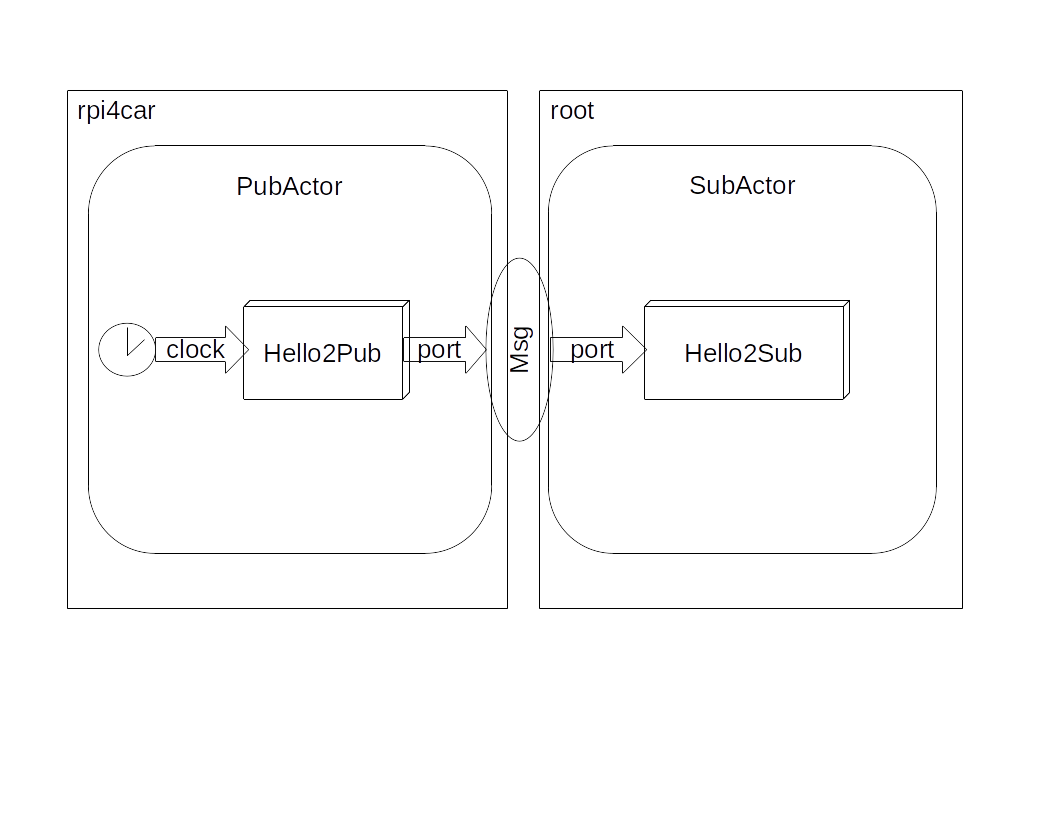
The architecture of the application is shown below.
Distributed estimator
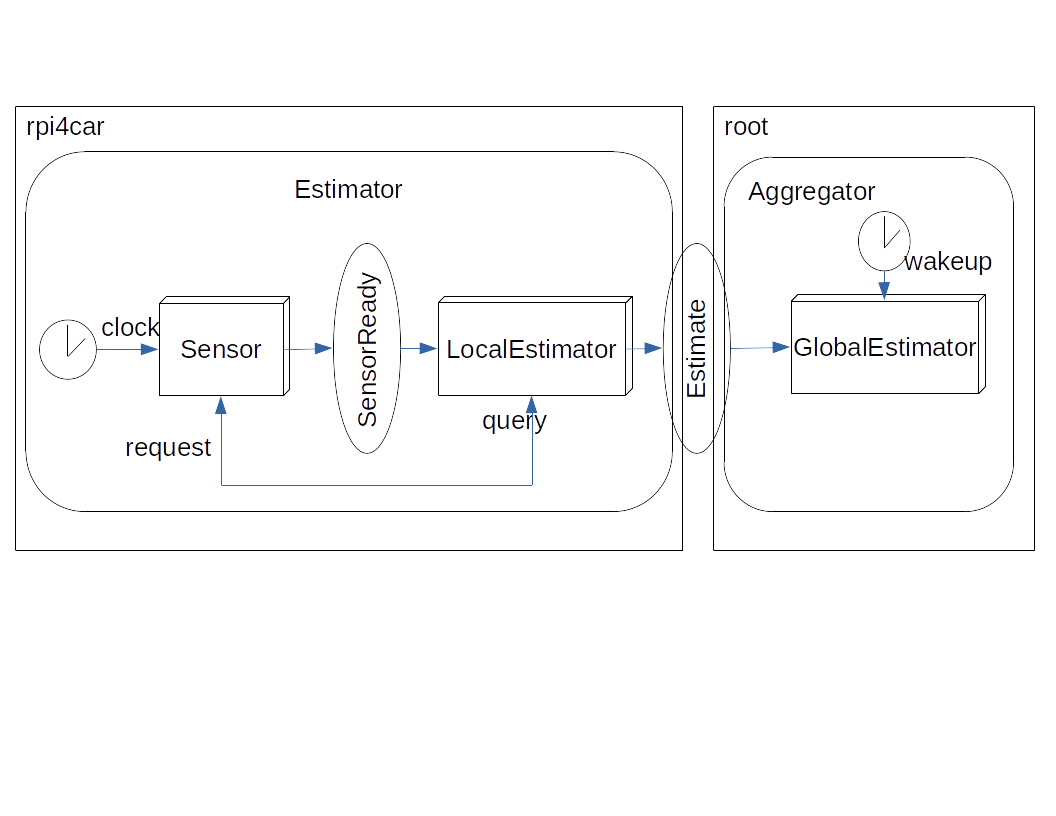
The application collects data from multiple sensors, the data is filtered by a (local) estimator, and send to a (global) aggregator. The sensors send a notification message to their estimator, which then queries that data. Typically sensor/estimator pairs are deployed on several hosts, while a single host runs the aggregator. Here we use one hosts (rpi4car) for a sensor estimator, and the root host for the aggregator.
Application model:
app DistributedEstimator:
   // Message types used in the app
    message SensorReady
    message SensorQuery
    message SensorValue
    message Estimate

   // Sensor component
    component Sensor:
      timer clock 1000                      // Periodic timer trigger to trigger sensor every 1 sec
      pub ready : SensorReady               // Publish port for SensorReady messages
      rep request : ( SensorQuery , SensorValue ) // Reply port to query the sensor and retrieve its value

    // Local estimator component
    component LocalEstimator:
      sub ready : SensorReady               // Subscriber port to trigger component with SensorReady messages
      req query : (SensorQuery , SensorValue )   // Request port to query the sensor and retrieve its value
      pub estimate : Estimate               // Publish port to publish estimated value messages

    // Global estimator
    component GlobalEstimator:
      sub estimate : Estimate                // Subscriber port to receive the local estimates
      timer wakeup 3000                      // Periodic timer to wake up estimator every 3 sec

    // Estimator actor
    actor Estimator:
       local SensorReady, SensorQuery, SensorValue   // Local message types
       // Sensor component
       sensor : Sensor
       // Local estimator, publishes global message 'Estimate'
      filter : LocalEstimator

    actor Aggregator:
       // Global estimator, subscribes to 'Estimate' messages
       aggr : GlobalEstimator

    // Distributed version
     host (rpi4car) Estimator
     host root Aggregator
Sensor.py:
from slacm.component import Component


class Sensor(Component):
    def __init__(self):
        super().__init__()
        self.logger.info("Sensor()")

    def on_clock(self):
        now = self.clock.recv_pyobj()   # Receive time.time() as float
        self.logger.info('on_clock(): %s' % str(now))
        msg = "data_ready"
        self.ready.send_pyobj(msg)

    def on_request(self):
        req = self.request.recv_pyobj()
        self.logger.info("on_request():%s" % req)
        rep = "sensor_rep"
        self.request.send_pyobj(rep)
LocalEstimator.py:
import os
from slacm.component import Component

class LocalEstimator(Component):
    def __init__(self):
        super().__init__()
        self.pid = os.getpid()
        self.pending = 0
        self.logger.info("LocalEstimator")

    def on_ready(self):
        msg = self.ready.recv_pyobj()
        self.logger.info("on_ready():%s [%d]" % (msg, self.pid))
        while self.pending > 0:     # Handle the case when there is a pending request
            self.on_query()
        msg = "sensor_query"
        if self.query.send_pyobj(msg):
            self.pending += 1

    def on_query(self):
        msg = self.query.recv_pyobj()
        self.logger.info("on_query():%s" % msg)
        self.pending -= 1
        msg = "local_est(" + str(self.pid) + ")"
        self.estimate.send_pyobj(msg)
GlobalEstimator.py:
from slacm.component import Component

class GlobalEstimator(Component):
    def __init__(self):
        super().__init__()
        self.logger.info("GlobalEstimator()")

    def on_wakeup(self):
        msg = self.wakeup.recv_pyobj()
        self.logger.info("on_wakeup():%s" % msg)

    def on_estimate(self):
        msg = self.estimate.recv_pyobj()
        self.logger.info("on_estimate():%s" % msg)
Note the use of the pending counter in the LocalEstimator: this ensures that the sender will process all
responses before sending a next one.
The architecture of the application is shown below.
Use of the query/answer ports
Application model:
app HelloApp:
    message MsgReq
    message MsgRep

    component HelloQuery:
      timer clock 1000
      qry port : (MsgReq,MsgRep)

   component HelloAnswer:
      ans port : (MsgReq,MsgRep)

    actor HelloActor:
       local MsgReq, MsgRep
       theQry1: HelloQuery
       theQry2: HelloQuery
       theAns: HelloAnswer
The application runs two HelloQuery components that send messages to the HelloAnswer server.
HelloQuery.py:
from slacm.component import Component

class HelloQuery(Component):

    def __init__(self):
        super().__init__()
        self.id = id(self)
        self.cnt = 0

    def on_clock(self):
        now = self.clock.recv_pyobj()
        self.logger.info('[%d]on_clock(): %s', self.id, str(now))
        msg = "msg.%d.%d" % (self.id,  self.cnt)
        self.cnt += 1
        self.port.send_pyobj(msg)
        self.logger.info("[%d]send: %s", self.id, msg)

    def on_port(self):
        rsp = self.port.recv_pyobj()
        self.logger.info("[%d]recv: %s", self.id, rsp)
The server queues up the requests and responds to them, in the order of arrival, after there is at least one more request.
HelloAnswer.py:
from slacm.component import Component

class HelloAnswer(Component):
    def __init__(self):
        super().__init__()
        self.queue = []                                 # Queue for storing messages

    def on_port(self):
        msg = self.port.recv_pyobj()
        self.logger.info('on_port(): recv = %s', msg)
        recent = (self.port.get_identity(),msg)      # The message comes with the sender's identity
        if len(self.queue) > 0:                      # If we have something in queue
            (identity,message) = self.queue.pop(0)   # ... take it out
            self.port.set_identity(identity)         # ... and send it back to its sender
            self.port.send_pyobj(message)
        self.queue.append(recent)                    # Append most recent message to queue
Note that use of the get_identity and set_identity operations. This ensures that the response goes back to the right
client.